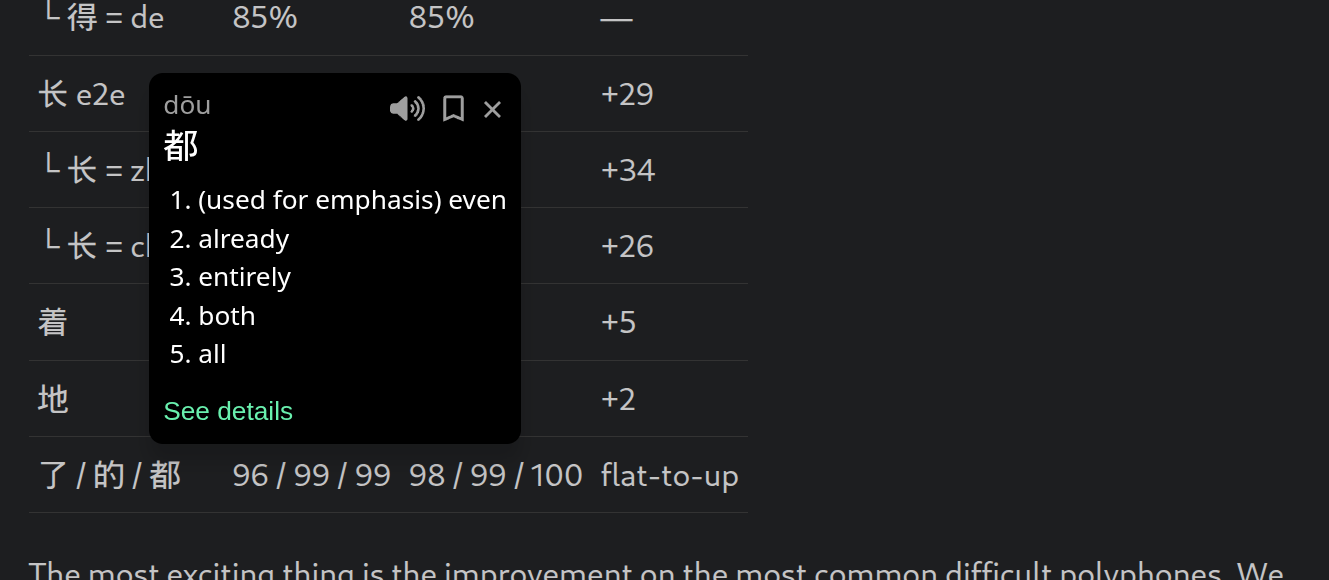
The core piece of functionality in Bookchoy is “tap on a character, see a popup with the dictionary definition”. Sounds simple, but because of the ambiguity in the language it’s not a trivial problem. I think while it can be a crutch, having the ability to not lose your flow in reading/navigating/writing is critical, to avoid just getting bored or frustrated and stopping the session. I want this functionality everywhere: on my phone, in my browser, in my primary text editor (neovim).
The easy way to solve the “what word is this” is to show all possible matches in the dictionary and let the user figure it out from context clues. That’s what I did for bookchoy.nvim. This is the approach I’ve seen in other apps and chrome extensions. Not great, it relies on the user to be a bit further along in their learning and still leaves room for mistakes. It also means if you want to show pinyin above the characters, you can only choose one for the most part, which is going to be your best guess which will probably be wrong a lot for 得/地/长/行 and the like.
An alternative solution is manually annotating text with correct word boundaries/dictionary mappings. This restricts things to a curated content library, so that’s not really any good for learning using content I’m actually interested in.
So, as I detailed in my previous posts, I want a model that has super high accuracy. There is jieba which seems to have been published in 2012 and last updated in 2019/2020. There’s also pinyin-jyutping but again, the accuracy isn’t good enough.
My first attempt at training my model was to train two separate ALBERT models: one for word segmentation and one for pinyin. The training data was from some github repo and it turned out to be labeled using the libraries above.. so I was just learning the wrong mappings. This was partially addressed by the harness that merged the results of the models and applied some manual crutches to bias things towards what was probably the natural distribution in the wild of the mappings to just push my arbitrary accuracy number higher.
My second attempt addressed the data issues, by using Gemini 3 (~November 2025) to label the same set of sentences + my own library of graded readers. This was better, but I made some mistakes in the labeling process and didn’t audit it well.
My third attempt was this weekend, and it had three pieces.
First, the training itself. I used karpathy/autoresearch. I let it look at my existing training loop and harness and asked it to focus on unifying the two model approach. The core intuition is that the correctt pinyin for a character in many cases is a result of the correct segmentation.
Second, a better labeling approach. This time I used the latest Gemini flash model, after finding the accuracy was barely higher with the Pro model despite a much higher price tag. The approach to the labeling this time was to tell the LLM my list of candidates based on the brute forced list of mappings from the dictionary, then asking it to pick the correct ones. I discard results that don’t line up with my dictionary, and let Claude iterate on a small sample set, improving the prompt and validation till the LLM could 100% my hand picked examples. Then on the full run, I audited inconsistencies on bigram/trigrams as well as pulled all samples containing the most ambiguous characters and then audited those partialy by hand, and partially using a more expensive and accurate LLM.
Third, the training loop was driven by an agent that tuned hyperparameters and tried a bunch of strategies for training algorithms and sampling algorithms which squeezed out a decent few points of accuracy on the long tail.
The new model is a single encoder, with multiple heads for the two different tasks, with the harness that combines their results no longer having manually tuned crutches to bias the results for certain cases. There are so many wins here:
- The model size went from 2 models totalling 32MB to a single 17MB model.
- The latency was reduced by about 40%.
- No hardcoded crutches. This is kind of a win in terms of generalization, but also may indicate I haven’t reached the ceiling yet on what I can squeeze out of these models.
Using the new labeled test data to compare the old and new models, the results are pretty good:
Overall:
| metric | Previous (shipped) | New (champion) | Δ |
|---|---|---|---|
| full word F1 | 96.85 | 97.67 | +0.82 |
| A-phonetic macro | 74.6 | 84.2 | +9.6 |
Full word F1 is easier than it looks. There are so many unique characters and super common segmentations that the unambiguous cases converge pretty quickly. We still made an improvement there. A small percentage increase there is actually pretty huge considering the scope of that metric.
A-phonetic macro is the avergage of per-reading accuracy on any character that has multiple readings. We made a huge jump there, which is really exciting because that’s the core problem we’re trying to solve. Most of the error cases are no longer pinyin errors but segmentation errors. I’m still not happy with it, but this is a data issue for sure, not a model issue. Even training a full sized BERT to attempt a distillation training workflow showed that training a tiny model performed just as well, suggesting model capacity is not the bottleneck.
Hard polyphones:
| reading | Previous | New | Δ |
|---|---|---|---|
| 得 e2e | 61% | 88% | +27 |
| └ 得 = dé | 23% | 90% | +67 |
| └ 得 = děi | 55% | 100% | +45 |
| └ 得 = de | 85% | 85% | — |
| 长 e2e | 62% | 91% | +29 |
| └ 长 = zhǎng | 52% | 86% | +34 |
| └ 长 = cháng | 72% | 98% | +26 |
| 着 | 85% | 90% | +5 |
| 地 | 89% | 91% | +2 |
| 了 / 的 / 都 | 96 / 99 / 99 | 98 / 99 / 100 | flat-to-up |
The most exciting thing is the improvement on the most common difficult polyphones. We are well past a coinflip now. Again, the improvements left on the table are bounded by the data I have available. Next time I have a free weekend we’re gonna do another round of labeling and training and hopefully I see a jump.
Shipping without perfect accuracy
While I’m happy with the big improvements, how can I plan on shipping this in an app targeting language learners without high 90s accuracy on everything? The key to making this not a big issue is the other piece of the new model harness: confidence.
| metric | value | meaning |
|---|---|---|
| AUROC | 0.97 | cleanly separates right from wrong (>0.8 = usable) |
| ECE | ~1–1.7% | predicted confidence ≈ actual accuracy (well-calibrated) |
| mean conf when right | 0.99 | |
| mean conf when wrong | 0.80 | |
| top-2 recovery | 95% | of the errors, the correct answer is the model’s #2 candidate |
Using confidence outputs in the UI allows me to proactively decide when I need to flalback to showing more candidates or a simple warning on an individual word that might be wrong according to the model. This helps me sleep better at night knowing I made an attempt to avoid misleading learners.
What’s next in Bookchoy
The next release will have this improved model baked in. The following release will have my new sync engine turned on, and the confidence based UI. Why a new sync engine? I’ll talk more about that in a future post, but it’s in service of a huge new feature: the Chrome extension! Netflix, iQiyi and ANY text on ANY webpage; all lets you quickly look up words, translate sentences and save them to review in the app.